2023년 8월 29일 화요일

git rejected error(feat. cherry-pick)

 문제


아무 생각 없이 pull을 받지않고 로컬에서 작업! 커밋, 푸시 진행을 해버렷다.


push에선 remote와 다르니 당연히 pull을 진행해라고 하지만


로컬에서 작업한 내용을 백업하지 않고 진행하기에는 부담스럽다(로컬작업 유실 가능성)


해결하려면 다음 방법을 쓰면 된다.


현재 실패한 상황 기준으로

1. git branch temp를 만들어 백업을 만든다.

2. git push origin temp 해서 remote에 백업을 올린다.

3. 다시 작업할 브랜치로 checkout 한다.

4. git fetch --all #remote에 있는 내 최신화된 저장소 정보를 받아온다.

5. git reset --hard origin/{작업브랜치} # origin/{작업브랜치} 의 commit 상황을 hard하게(강제로) 덮어씌운다

#자동 병합이 안된다면 다시 수동 병합 후 저장->add->commit 까지 평소처럼 진행

6. git log --branches --oneline # temp브랜치의 아이디를 확인

7. git cherry-pick [아이디7자리] #명령어를 입력하면 commit을 가져오면서 충돌이 있던 파일도 자동으로 병합해줌

#자동 병합이 안된다면 다시 수동 병합 후 저장->add->commit 까지 평소처럼 진행

8. git log 명령어로제대로 된지 확인

9. 성공적으로 잘 적용 됫다면 git push명령어로 remote에 적용하고 마무리!

2023년 8월 26일 토요일

[Unity] firebase storage에서 폴더째로 삭제하기(feat. google cloud functions)

 firebase unity sdk에서는 저장소의 listall같은 기능(하위경로 확인)이 존재하지 않는다.


그래서 goolge cloude function을 이용하여 구현하여야 한다.


## 공식 문서링크

https://cloud.google.com/functions/docs?hl=ko


요금은 대략

월 200만건 무료이고

100만건당 0.4달러


라고 보면된다 (CPU환경이나 메모리에따라 요금 상이함)


# 하는 방법

기존 firebase와 연결해 놓은 googlecloud 를 이용한다.


대시보드


---


Cloud Functions 클릭

---


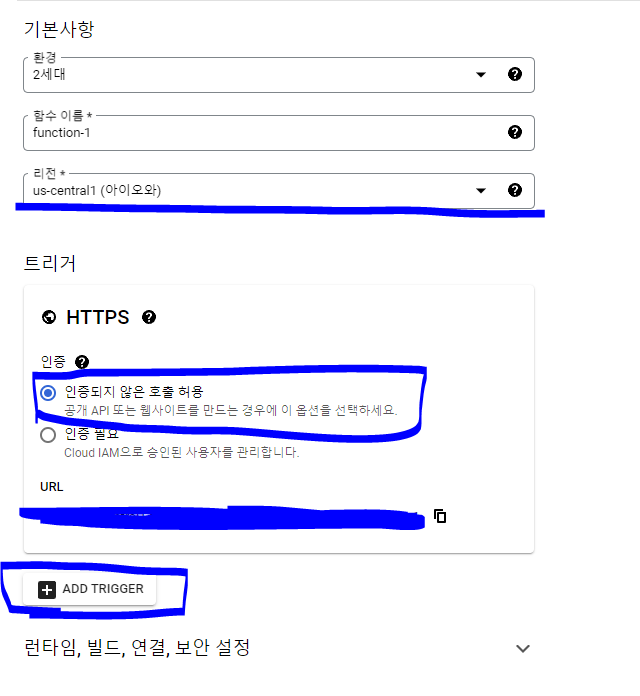
함수 만들기 눌러서 
인증되지 않은 호출 허용 체크
리전 선택
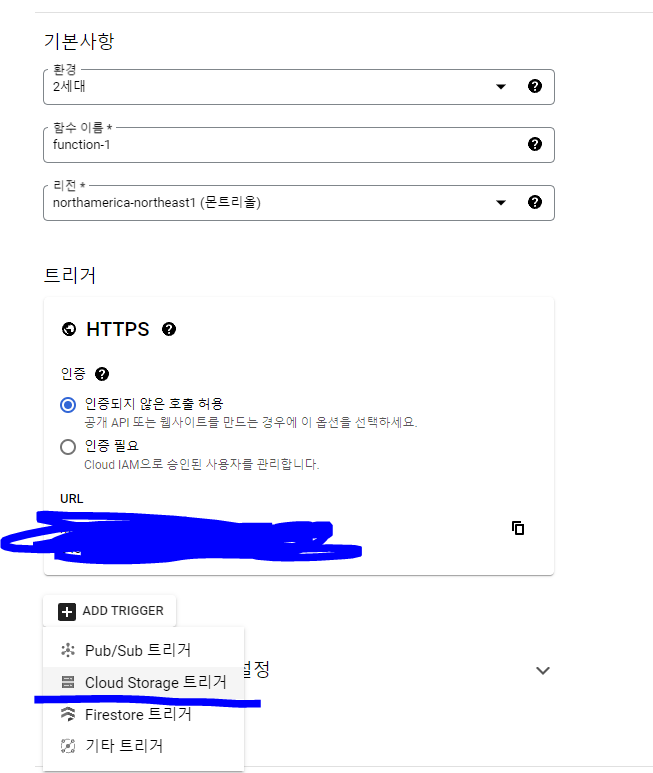
ADD 트리거 클릭


---

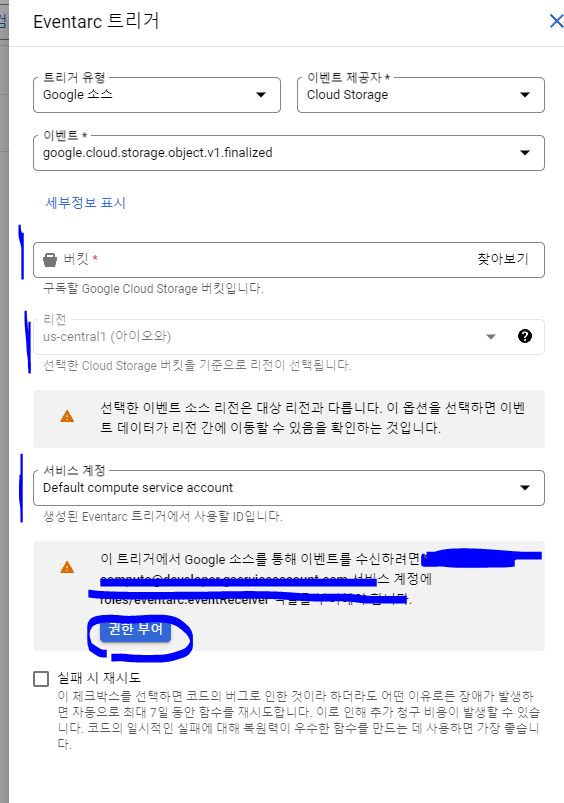
트리거 Storage 선택

---

각종 설정 알잘딱 하시고


---


노드 코드 
진입점 똑같이 맞춰주시고


package.json 코드도 맞춰주기


---

node.js
```
const functions = require('@google-cloud/functions-framework');
const {Storage} = require('@google-cloud/storage');
const storage = new Storage();

// Register an HTTP callback with the Functions Framework.
functions.http('listFilesInFolder', async (req, res) => {
  const bucketName = req.query.bucket; // 버킷 이름
  const folderPath = req.query.folder; // 폴더 경로

  if (!bucketName || !folderPath) {
    res.status(400).send('Missing bucket or folder parameter');
    return;
  }

  try {
    const options = {
      prefix: folderPath,
    };

    const [files] = await storage.bucket(bucketName).getFiles(options);

    // 'files' is an array of File objects.
    res.send(files.map(file => file.name));
  } catch (err) {
    console.error('ERROR:', err);
    res.status(500).send(err);
  }
});
```

package.json

```
{
  "dependencies": {
    "@google-cloud/functions-framework": "^3.0.0",
     "@google-cloud/storage": "^7.0.1"
  }
}

```


유니티에서 제가 사용한 코드입니다

대략 이런식으로 사용하시면 됩니다
```
using Firebase.Storage;
using System;
using System.Collections;
using System.Collections.Generic;
using UnityEngine;
using UnityEngine.Events;
using UnityEngine.Networking;

public class FirebaseStorageAllBucketList : MonoBehaviour
{


    public List<string> stringList;
    public int deleteCnt;

    public string folderPath;

    [System.Serializable]
    public static class JsonHelper
    {
        public static List<T> FromJson<T>(string json)
        {
            string newJson = "{ \"array\": " + json + "}";
            Wrapper<T> wrapper = JsonUtility.FromJson<Wrapper<T>>(json);
            return wrapper.Items;
        }
        private class Wrapper<T>
        {
            public List<T> Items;
        }
    }


    public void CallGetallBucket(string folderPath)
    {
        StartCoroutine(GetBucketList(folderPath));
    }


    IEnumerator GetBucketList(string folderPath )
    {

        string url = $"(함수 url 입력)?bucket=(사용자 버킷)&folder={folderPath}";

        using (UnityWebRequest www = UnityWebRequest.Get(url))
        {
       

            yield return www.SendWebRequest();

            if (www.result != UnityWebRequest.Result.Success)
            {
                Debug.Log(www.error);
            }
            else
            {
                Debug.Log(www.downloadHandler.text);
                string[] splitArray = www.downloadHandler.text.TrimStart('[').TrimEnd(']').Split(',');

                stringList = new List<string>();
               
                foreach (string item in splitArray)
                {
                    stringList.Add(item.Trim().Trim('\"'));
                }
                deleteCnt = stringList.Count;
            }
        }
    }
}


```


이상입니다!


2023년 4월 23일 일요일

unity side slider(center Start)


가운데 부터 시작해서 양쪽을 채우는 슬라이더


using UnityEngine;
using UnityEngine.UI;

[RequireComponent(typeof(Slider))]
public class SliderSwitcher : MonoBehaviour
{
    private Slider _slider;

    void Awake()
    {
        _slider = GetComponent<Slider>();

        _slider.onValueChanged.AddListener(delegate { UpdateSliderSense(); });
    }
private void Start() { UpdateSliderSense(); // init }

    public void UpdateSliderSense()
    {
        if (_slider.value > 0)
        {
            _slider.fillRect.anchorMin = new Vector2(0.5f, 0);
            _slider.fillRect.anchorMax = new Vector2(_slider.handleRect.anchorMin.x, 1);
        }
        else
        {
            _slider.fillRect.anchorMin = new Vector2(_slider.handleRect.anchorMin.x, 0);
            _slider.fillRect.anchorMax = new Vector2(0.5f, 1);
        }
    }
}


2023년 4월 17일 월요일

Unity 에서 만,억,조,경,해 등등 큰숫자 표현


코드


using System;
using System.Collections;
using System.Collections.Generic;
using System.Numerics;
using System.Text;
using UnityEngine;

public class BigCountTest : MonoBehaviour
{

    public int viewcnt;//원하는 단위까지 표현


    private string[] formatnumberarray = new string[]
    {"","만","억","조","경","해","자","양","가","구","간" };
    private string GetintText(int viewcnt=0)
    {
       

        int placeN = 4;
        BigInteger value = myint;
        List<int> numberList = new List<int>();
        int p = (int)Mathf.Pow(10, placeN);

        do
        {
            numberList.Add((int)(value % p));
            value /= p;
        } while (value>=1);

        string retstr="";


        if (viewcnt != 0)
        {
            viewcnt = Mathf.Max(0, numberList.Count - viewcnt);
        }

        for (int index = viewcnt; index < numberList.Count; index++)
        {
            retstr = numberList[index] + formatnumberarray[index] + retstr;
        }

        return retstr;
    }

    public string txt_display;
    BigInteger myint;


    // Start is called before the first frame update
    void Start()
    {
        myint = 123456548;
        string encodedNumber = GetintText();
        Debug.Log("Encoded number: " + encodedNumber);
    }

    // Update is called once per frame
    void Update()
    {
        if (Input.GetKeyDown(KeyCode.Y))
        {
            txt_display = GetintText();
        }
        if (Input.GetKeyDown(KeyCode.U))
        {
            txt_display = GetintText(viewcnt);
        }
        if (Input.GetKeyDown(KeyCode.T))
        {
            myint += myint;
        }
    }
}


2023년 3월 30일 목요일

unity (waitUntil) 최적화 [unity coroutine optimization]


waitUntil을 추가했음


## 효과

yield new 로 생기는 가비지콜렉션을 줄일수있다.


참고

https://velog.io/@livelyjuseok/C-Unity-%EC%BD%94%EB%A3%A8%ED%8B%B4-Yield-%EC%B5%9C%EC%A0%81%ED%99%94-%ED%95%98%EA%B8%B0IEqualityComparer


## 사용예

```
yield return YieldCache.WaitForEndOfFrame;
        yield return YieldCache.WaitUntilcustom(() => isLoginSuccess);
        yield return YieldCache.WaitUntilcustom(() => FirebaseDataManager.Instance != null);
        yield return YieldCache.WaitUntilcustom(() => DataPersistenceManager.Instance != null);

        //yield return new WaitForEndOfFrame();
        //yield return new WaitUntil(() => isLoginSuccess);
        //yield return new WaitUntil(() => FirebaseDataManager.Instance !=null);
        //yield return new WaitUntil(() => DataPersistenceManager.Instance != null);

```


## 최적화 코드
```csharp 최적화 코드
using System;
using System.Collections;
using System.Collections.Generic;
using UnityEngine;
static class YieldCache
{
    class FloatComparer : IEqualityComparer<float>
    {
        bool IEqualityComparer<float>.Equals(float x, float y)
        {
            return x == y;
        }
        int IEqualityComparer<float>.GetHashCode(float obj)
        {
            return obj.GetHashCode();
        }
    }


    class FloatComparerbool : IEqualityComparer<Func<bool>>
    {
        bool IEqualityComparer<Func<bool>>.Equals(Func<bool> x, Func<bool> y)
        {
            return x == y;
        }
        int IEqualityComparer<Func<bool>>.GetHashCode(Func<bool> obj)
        {
            return obj.GetHashCode();
        }
    }

    public static readonly WaitForEndOfFrame WaitForEndOfFrame = new WaitForEndOfFrame();
    public static readonly WaitForFixedUpdate WaitForFixedUpdate = new WaitForFixedUpdate();

    private static readonly Dictionary<float, WaitForSeconds> _timeInterval = new Dictionary<float, WaitForSeconds>(new FloatComparer());
    private static readonly Dictionary<float, WaitForSecondsRealtime> _timeIntervalReal = new Dictionary<float, WaitForSecondsRealtime>(new FloatComparer());
    private static readonly Dictionary<Func<bool>, WaitUntil> _waitUntill = new Dictionary<Func<bool>, WaitUntil>(new FloatComparerbool());

    public static WaitForSeconds WaitForSeconds(float seconds)
    {
        WaitForSeconds wfs;
        if (!_timeInterval.TryGetValue(seconds, out wfs))
            _timeInterval.Add(seconds, wfs = new WaitForSeconds(seconds));
        return wfs;
    }

    public static WaitForSecondsRealtime WaitForSecondsRealTime(float seconds)
    {
        WaitForSecondsRealtime wfsReal;
        if (!_timeIntervalReal.TryGetValue(seconds, out wfsReal))
            _timeIntervalReal.Add(seconds, wfsReal = new WaitForSecondsRealtime(seconds));
        return wfsReal;
    }

    public static WaitUntil WaitUntilcustom(Func<bool> state)
    {
        WaitUntil wfsReal;
        if (!_waitUntill.TryGetValue(state, out wfsReal))
            _waitUntill.Add(state, wfsReal = new WaitUntil(state));
        return wfsReal;
    }

}


2023년 2월 14일 화요일

2022년 11월 16일 수요일

실수로 git pull 햇을때 로컬 되살리기


>[!warning] # 무조건 지켜야 하는 법칙(로컬을 살리기위해,협업을 위해)

> git pull 을 하기전에 

> # **stash** 명령어로 로컬 저장!!

> - 반드시  를 해서 local의 변경사항을 저장하자!!!

> 

> 하지 않는다면 되돌릴수없는 강을 건너게 된다...


2022년 11월 2일 수요일

Unity UI On GameObjectPostion


void DrawTest()
    {

        // Offset position above object bbox (in world space)
        float offsetPosY = target.transform.position.y;

        // Final position of marker above GO in world space
        Vector3 offsetPos = new Vector3(target.transform.position.x, offsetPosY, target.transform.position.z);

        // Calculate *screen* position (note, not a canvas/recttransform position)
        Vector2 canvasPos;
        Vector2 screenPoint = Camera.main.WorldToScreenPoint(offsetPos);

        // Convert screen position to Canvas / RectTransform space <- leave camera null if Screen Space Overlay
        RectTransformUtility.ScreenPointToLocalPointInRectangle(MainCanvasRect, screenPoint, null, out canvasPos);

        // Set
        imageRectTransform.localPosition = canvasPos;
    }


DrawLine


  // Offset position above object bbox (in world space)
  float offsetPosY = target.transform.position.y + 1.5f;
 
  // Final position of marker above GO in world space
  Vector3 offsetPos = new Vector3(target.transform.position.x, offsetPosY, target.transform.position.z);
 
  // Calculate *screen* position (note, not a canvas/recttransform position)
  Vector2 canvasPos;
  Vector2 screenPoint = Camera.main.WorldToScreenPoint(offsetPos);
 
  // Convert screen position to Canvas / RectTransform space <- leave camera null if Screen Space Overlay
  RectTransformUtility.ScreenPointToLocalPointInRectangle(canvasRect, screenPoint, null, out canvasPos);
 
  // Set
  markerRtra.localPosition = canvasPos;


2022년 10월 27일 목요일

ml agent unity 초기 설정방법(anaconda,Window)


1. Unity 설치 (2020.3이상)


2. anaconda 설치


3.가상환경 만들기


- conda create -n MLAgent python =3.7.9


4. 해당 가상환경에 pytorch설치


## pip3 install torch~=1.7.1 -f https://download.pytorch.org/whl/torch_stable.html


![[Pasted image 20221030163156.png]]


5. 해당 가상환경에 mlagent 설치


## python -m pip install mlagents==0.28.0


![[Pasted image 20221030163252.png]]


2022년 10월 26일 수요일

unity 2d sprite animation


using System.Collections;
using System.Collections.Generic;
using UnityEngine;
using UnityEngine.UI;
using System;

[Serializable]
public struct SpriteInfo
{
    public Image sourceImage;
    public Sprite[] textureArray;
    public float frameRate;
   
}

public class SpriteAnimation : MonoBehaviour
{

    [SerializeField] SpriteInfo s_Info;


    [SerializeField] float frameTimer;
    [SerializeField] int currentFrame;
    [SerializeField] int frameCount;


    // Start is called before the first frame update
    void Start()
    {
       
    }

    // Update is called once per frame
    void Update()
    {
        if (Input.GetKeyDown("1"))
        {
            StartCoroutine(StartSprite(s_Info));
        }
    }


    IEnumerator StartSprite(SpriteInfo info)
    {
        frameTimer = info.frameRate;
        frameCount = info.textureArray.Length;

        //Rect rect = new Rect(0, 0, info.textureArray[0].width, info.textureArray[0].height);

        while (true)
        {
            frameTimer -= Time.deltaTime;
            if (frameTimer <= 0f)
            {
                frameTimer += info.frameRate;
                currentFrame = (currentFrame + 1) % frameCount;
                info.sourceImage.sprite = info.textureArray[currentFrame];
                Debug.Log(info.sourceImage.sprite.name);
                //info.sourceImage.sprite = Sprite.Create(info.textureArray[currentFrame],rect,Vector2.zero);
            }
            yield return new WaitForEndOfFrame();
        }
    }


}


2022년 10월 20일 목요일

TryGetComponent Unity


using UnityEngine;

public class TryGetComponentExample : MonoBehaviour
{
    void Start()
    {
        if (TryGetComponent(out HingeJoint hinge))
        {
            hinge.useSpring = false;
        }
    }
}


2022년 10월 19일 수요일

Unity animation use Slider UI


using System.Collections;
using System.Collections.Generic;
using UnityEngine;
using UnityEngine.UI;

public class AnimationTruck : MonoBehaviour
{
    public Animation ani;
    public string clip_name;
    public float ani_time;

    [Header("Animation Slider")]
    [SerializeField] Slider AnimationSlider;
    [SerializeField] float speed;

    private void Start()
    {
        Hide();
        if (AnimationSlider != null)
        {
            AnimationSlider.maxValue = ani[clip_name].length;


            AnimationSlider.onValueChanged.AddListener(delegate
            { OnChangeAnimationBySlider(AnimationSlider);
            });

        }
    }


    void OnChangeAnimationBySlider(Slider slider)
    {
        if (!ani.isPlaying)
        {
            ani.Play();
            ani[clip_name].speed = 0;
        }

        //ani[clip_name].speed = speed;
        ani[clip_name].time = slider.value;

    }


    public void ToggleAnimation(Toggle m_toggle)
    {
        if (m_toggle.isOn)
        {
            Show();
        }
        else
        {
            Hide();
        }
    }

    private void Update()
    {
        if (AnimationSlider == null)
                return;
        
            if (AnimationSlider.value != ani[clip_name].time)
            {
                AnimationSlider.value =  ani[clip_name].time;
            }
    }

    public void Hide()
    {
        //if (ani_time == ani[clip_name].length)
        //    return;

        ani_time = ani[clip_name].time;

        func_playAni(ani_time, clip_name);

    }
    public void Show()
    {

        if (ani_time == 0)
            ani_time = ani[clip_name].length;
        else
            ani_time = ani[clip_name].time;


        func_reversPlay(ani_time, clip_name);

    }


    public void func_playAni(float time, string aniName)
    {

        ani[aniName].time = time;
        ani[aniName].speed = speed;
        ani.Play();

    }

    public void func_reversPlay(float time, string aniName)
    {
        ani[aniName].time = time;
        ani[aniName].speed = -speed;
        ani.Play();
    }
}


2022년 10월 16일 일요일

searchBox.cs


using System.Collections;
using System.Collections.Generic;
using UnityEngine;
using TMPro;
using System;
using System.Linq;

public class SearchDropBoxInit : MonoBehaviour
{

    [SerializeField] TMP_Dropdown dr_car;
    [SerializeField] TMP_Dropdown dr_company;
    [SerializeField] TMP_Dropdown dr_product;

    [SerializeField] SearchDropBoxOpen uic_car;
    [SerializeField] SearchDropBoxOpen uic_company;
    [SerializeField] SearchDropBoxOpen uic_product;


    [SerializeField] TextMeshProUGUI txt_result_car;
    [SerializeField] TextMeshProUGUI txt_result_company;
    [SerializeField] TextMeshProUGUI txt_result_product;

    [Header("Scrollview")]
    [SerializeField] CompanyItemTableViewController m_CompanyItemTableViewController;
    [Header("Search")]
    [SerializeField] TMP_InputField m_TMP_InputField;

    List<CompanyUiItem> originTable;
    // Start is called before the first frame update
    void Start()
    {
        StartCoroutine(InitData());
        StartCoroutine(InitScrollView());
    }

    IEnumerator InitData()
    {
        yield return new WaitUntil(() => LoadPartLinksWebGL.Instance.m_xmlLoadDatas.m_dataCarsXml.data.Count != 0);
        SetFunction_UI(dr_car, LoadPartLinksWebGL.Instance.m_xmlLoadDatas.m_dataCarsXml.data, uic_car, txt_result_car);
        SetFunction_UI(dr_company, LoadPartLinksWebGL.Instance.m_xmlLoadDatas.m_dataCompanysXml.data, uic_company, txt_result_company);
        SetFunction_UI(dr_product, LoadPartLinksWebGL.Instance.m_xmlLoadDatas.m_dataProductsXml.data, uic_product, txt_result_product);
    }

    IEnumerator InitScrollView()
    {
        yield return new WaitUntil(() => LoadPartLinksWebGL.Instance.m_AllProgramPath.links.Count != 0);
        SetScrollview();

        //m_TMP_InputField.onEndEdit.AddListener(ValueChanged);
        m_TMP_InputField.onValueChanged.AddListener(ValueChanged);
    }


    void SetScrollview()
    {

        originTable = new List<CompanyUiItem>();

       
        foreach (var x in LoadPartLinksWebGL.Instance.m_AllProgramPath.links)
        {
            CompanyUiItem temp = new CompanyUiItem();

            ///회사이름이 없으면 일반씬이므로 컨티뉴
            if (x.Value.companyName == "")
                continue;

            temp.companyName = x.Value.companyName;
            temp.companyType = x.Value.companyType;
            temp.url = x.Value.url;
            temp.products = x.Value.products;
            temp.cars = x.Value.targetCar;
            originTable.Add(temp);
        }
        m_CompanyItemTableViewController.UpdateData(originTable);

    }


    #region 검색
    public List<CompanyUiItem> SearchTableData(string input)
    {
        if (input.Length == 0)
            return originTable;


        input = input.Replace(",", ""); ///따움표는 없는걸로 체크


        Func<CompanyUiItem,bool> condition_car; //검색 조건
        Func<CompanyUiItem, bool> condition_products; //검색 조건
        Func<CompanyUiItem, bool> condition_companyName; //검색 조건
        Func<CompanyUiItem, bool> condition_companyType; //검색 조건
       
        //Func<CompanyUiItem, object> order; //정렬 기준
        string search = input.ToLower(); //소문자로 변환

        condition_car = item => item.cars.Where(x=> x.ToLower().Contains(search)).Any();
        condition_products = item => item.products.Where(x => x.ToLower().Contains(search)).Any();
        condition_companyName = item => item.companyName.ToLower().Contains(search);
        condition_companyType = item => item.companyType.ToLower().Contains(search);


        IEnumerable<CompanyUiItem> result_car;
        IEnumerable<CompanyUiItem> result_products;
        IEnumerable<CompanyUiItem> result_company;
        IEnumerable<CompanyUiItem> result_type;

        result_car = originTable.Where(condition_car);
        result_products = originTable.Where(condition_products);
        result_company = originTable.Where(condition_companyName);
        result_type = originTable.Where(condition_companyType);

        //result = originTable.Where(condition_car).Where(condition_companyName).Where(condition_companyType).Where(condition_products);
        result_car = result_car.Select(x => new CompanyUiItem
        {
            companyName = x.companyName,
            companyType = x.companyType,
            cars = x.cars,
            products = x.products,
            url = x.url,
        });
        result_products = result_products.Select(x => new CompanyUiItem
        {
            companyName = x.companyName,
            companyType = x.companyType,
            cars = x.cars,
            products = x.products,
            url = x.url,
        });
        result_company = result_company.Select(x => new CompanyUiItem
        {
            companyName = x.companyName,
            companyType = x.companyType,
            cars = x.cars,
            products = x.products,
            url = x.url,
        });
        result_type = result_type.Select(x => new CompanyUiItem
        {
            companyName = x.companyName,
            companyType = x.companyType,
            cars = x.cars,
            products = x.products,
            url = x.url,
        });

        IEnumerable<CompanyUiItem> result  =
            new[] { result_car, result_products, result_company, result_type }.
            Where(x=>x!=null).
            SelectMany(x => x).
            Distinct();
        return result.ToList();
    }


    void ValueChanged(string text)
    {

        string[] texts = text.Split(",");


        if (texts.Length == 0)
        {
            m_CompanyItemTableViewController.UpdateData(SearchTableData(text));
        }
        else
        {
            List<CompanyUiItem> result = new List<CompanyUiItem>();
            foreach (var x in texts)
                result.AddRange(SearchTableData(x));

            m_CompanyItemTableViewController.UpdateData(result);
        }
    }

    #endregion


    #region 드롭다운
    private void SetFunction_UI(TMP_Dropdown dropdown,List<string> data, SearchDropBoxOpen uic,TextMeshProUGUI result)
    {
        //Reset
        ResetFunction_UI(dropdown, data);


        // Set Default Value
        result.text = dropdown.options[dropdown.value].text;


        dropdown.onValueChanged.AddListener(delegate {
            Function_Dropdown(dropdown, uic, result);
        });
    }

    //private void Function_Button()
    //{
    //    string op = dropdown.options[dropdown.value].text;
    //    result.text = op;
    //    result_img.sprite = dropdown.options[dropdown.value].image;
    //    Debug.LogError("Dropdown Result!\n" + op);
    //}
    private void Function_Dropdown(TMP_Dropdown select, SearchDropBoxOpen uic, TextMeshProUGUI result)
    {
        string op = select.options[select.value].text;
        //message.text = op;
        Debug.Log("Dropdown Change!\n" + op);
        result.text = op;
        uic.Hide();
    }

    private void ResetFunction_UI(TMP_Dropdown dropdown,List<string> data)
    {
       
        dropdown.onValueChanged.RemoveAllListeners();
        dropdown.options.Clear();

        for (int i = 0; i < data.Count; i++)
        {
            int idx = i;
            TMP_Dropdown.OptionData newData = new TMP_Dropdown.OptionData();
            newData.text = data[idx];
            //newData.image = sprites[i];
            dropdown.options.Add(newData);
        }
        dropdown.SetValueWithoutNotify(-1);
        dropdown.SetValueWithoutNotify(0);

    }

    #endregion

}


git rejected error(feat. cherry-pick)

 문제 아무 생각 없이 pull을 받지않고 로컬에서 작업! 커밋, 푸시 진행을 해버렷다. push에선 remote와 다르니 당연히 pull을 진행해라고 하지만 로컬에서 작업한 내용을 백업하지 않고 진행하기에는 부담스럽다(로컬작업 유실 가능성) 해결하려...